Use the GPUs you already have
Run marked pytest tests on local or lab hardware and bring the results into ordinary CI.
Run GPU tests locally.
Verify signed results in CPU-only CI.
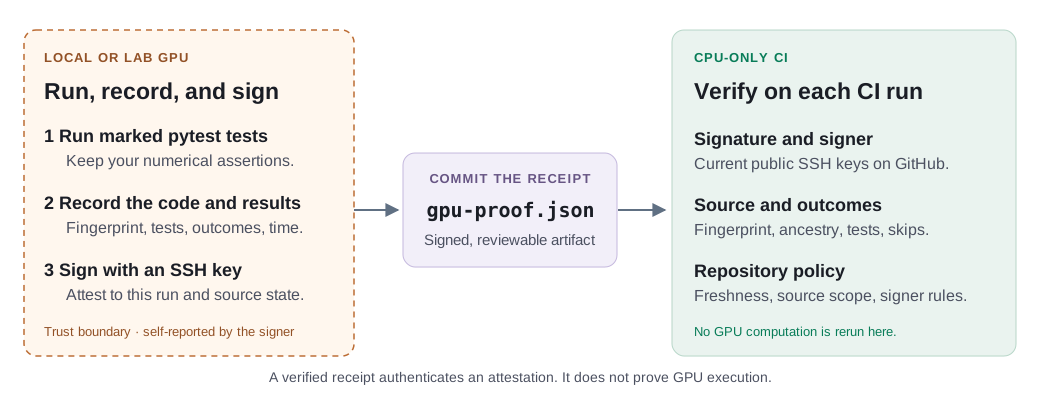
Bring GPU testing into everyday development without an always-on GPU CI runner. Record local pytest results in a signed receipt that connects the tests, outcomes, and source code, then verify that receipt in ordinary CPU-only CI.

Run marked pytest tests on local or lab hardware and bring the results into ordinary CI.
Signed receipts record the source fingerprint, selected tests, outcomes, and run time. Verification detects mismatched code and checks freshness.
Accept contributor-signed receipts or restrict verification to approved users and keys.
Use Python 3.11 or newer and an SSH private-key file whose public key is registered on GitHub. Run these commands from the Git repository you want to test.
python -m pip install pytest-gpu-proofAdd @pytest.mark.gpu_proof to existing GPU tests. Keep their assertions, or use the optional comparison fixture to check a GPU implementation against a reference. Commit your source and test changes before recording.
pytest tests/gpu --gpu-proof-enable \
  --gpu-proof-github-user YOUR_GITHUB_USER
gpu-proof verify --receipt gpu-proof.json --repo .
Replace tests/gpu with your test path. The default fingerprint covers tracked files. Declare generated or ignored inputs explicitly if your tests depend on them.
git add gpu-proof.json
git commit -m "Record local GPU test receipt"
After checking out the repository and installing the plugin on your CPU runner, add this verification step.
- name: Verify local GPU test receipt
  run: gpu-proof verify --receipt gpu-proof.json --repo .
Verification rejects failed tests and, by default, skipped tests. Source mismatches and stale receipts fail verification rather than silently reusing old results.
Follow the complete quickstart →Configure repository policy →
A receipt authenticates a signer’s statement about a test run. It does not prove that a GPU executed the tests or that the signing machine was trustworthy.
Verification checks the signature against the signer’s current public SSH keys on GitHub, checks the source fingerprint and recorded outcomes, and applies repository policy. Open mode accepts any valid GitHub signer by default. Restricted mode adds user or key allowlists.
Receipts support accountable review and catch stale results. They do not replace test quality, pull-request review, or controlled GPU CI when a local signer cannot be trusted.
Read the full security model →pytest-gpu-proof: Enabling Cloud-CPU Continuous Integration for GPU Code with Local GPU Attestation
The two-page paper introduces the local-run workflow, source-bound receipts, and the trust model behind CPU-only verification.
@misc{plancher2026pytestgpuproof,
  title={pytest-gpu-proof: Enabling Cloud-CPU Continuous Integration for GPU Code with Local GPU Attestation},
  author={Brian Plancher},
  year={2026},
  eprint={2609.28862},
  archivePrefix={arXiv},
  primaryClass={cs.DC},
  url={https://arxiv.org/abs/2609.28862}
}